Silence the Volcano this Science Fair
Science fairs and expos provide exciting opportunities for kids to work as scientists. Stop rehashing overused projects, like “Model Volcano,” and follow these tips to help your kid develop a project based on his or her own authentic question.

Get kids investigating real questions that arise day-to-day — that’s authentic science in action!

No activity strikes more anxiety -- or Nobel-caliber competitiveness -- into your household than your kid’s annual school science fair. Stop recycling the same old “Model Volcano” project. Follow these tips to power up your kid’s science fair project by helping her get started the right way. Steer your kid towards something personally meaningful this year!
Jot Down “Why?” Questions Daily (Starting on School Day 1!)
Despite the awful, rote way in which many parents were taught science, science instruction should be all about asking and answering questions about the wondrous world around us. Your toddler peppered you constantly with “Why?” inquiries. Rekindle that natural scientific curiosity in your household by having your kid keep a running log of questions as he or she goes about normal daily life. Not all of the questions will start with “Why?” -- in fact none of these questions do! -- but each should be framed as an interrogative:
Are crickets actually chirping more at night, or does it just seem that way when we’re trying to sleep?
How come our electric car uses up its charge at a different rate in the summer than in the winter?
How many helium balloons would it take to levitate our Corgi? (Remember, asking the question doesn’t mean it’s a project you should actually conduct.)
How much does upholstery color or tinting impact our car’s internal temperature?
Are Google Map travel times good estimates, and should we trust them?
Can I catch something from using someone else’s makeup?
Are some pool chemicals better at killing algae than others?
How well do people’s facial proportions match the golden ratio?
Does room color affect my mood? (And should we figure that out before we paint my room fire-engine red?)
Do older people hear a different range of sounds than young people? (My high schoolers love experimenting with, “Who can hear this ear-piercing screech?” in the classroom.)
Record these “Why?” questions daily on a fridge whiteboard, in a journal, in your phone notes -- anywhere it’s quick and easy to access. The goal is simply to compile a list of real curiosities that your kid personally experiences or ponders. Doing so over a couple of months is a no-stress way to generate authentic ideas for a project!
Evaluate Headline-Worthiness
Once your kid had generated a list of “Why?” questions, it’s time to evaluate the “Who cares?” value of each question. While it’s likely that someone, somewhere, cares about every question on the list, a small subset of the queries will stand out as having relevance to the larger world. Some examples:
My own first science fair project measured the heart rate of Daphnia (water flies) when strobe lights, jam-packed populations, and other factors disrupted their normal environment. The results -- that urban stressors produced amped-up resting heart-rates -- were headline-worthy for everyone from club-goers to city-dwellers.
In a group science fair project with elementary kids, my students quantified how much liquid different brands of adult diapers held. They compared these values with how much urine a diaper would need to hold for astronauts awaiting launch and verified actual NASA lift-off criteria for space suits. Because halting launch cycle to pee is a multi-million dollar pit stop that’s impossible to make!
One of my kids wanted to know why, when we’re driving in traffic, we’re constantly surprised by emergency vehicles: why didn’t we hear the sirens blaring sooner? His experiments found that several factors including siren angle, car insulation and air conditioning can make it hard for a driver to notice and react to emergency vehicles. This sets the stage for new emergency alert technologies to improve traffic responsiveness to fire trucks, police and ambulances.
A 12-year-old Florida girl found her headline project by investigating consumer safety. She discovered that fast-food ice is dirtier than toilet water, sparking chain restaurants to examine their safety protocols for cleaning drink dispensers.
Connecting a science fair project to a bigger issue elevates the interest of your kid, the judges, and perhaps, local press. Winnow down the original “Why?” questions to a short list which has broader importance and impacts more than just your household. Direct your kid to research online news articles and -- for more experienced kids -- abstracts of recent scientific studies (many of which can be found on Google Scholar and Academia.edu) to build those links. Then help your kid set up the story of the overarching relevance every time he or she presents the topic: in the written report, on the display boards, and in the oral presentation. What may start out as a simple science fair project may end up with significant impact on your kid’s community and environment.
Give it a Great Title
While titling a science fair project may seem trivial, remind your kid that the title of anything -- a news headline, a theme-park ride, even a person’s professional position (Disney “Imagineer”) -- creates the first impression of that thing. Make the science fair project stand out from the glut of other projects by giving it an impactful and meaningful title. Create the title in two parts: a short snappy title to capture attention, followed optionally with a subtitle that conveys more scientific specifics and clarifies the content of the project. Here are some examples:
How Mona Lisa are You?
Facial proportions and the Golden RatioWeapon or Decoy
Determining where to aim in missile defensePopulation Density Stress
The impact of city living on human healthPull Over and Stop!
Emergency vehicle accidents and siren effectiveness
And be aware that, even with an easy-to-understand title, the press may still screw it up. Although my own Weapon or Decoy project examined a highly headline-worthy theme addressing the US-Russia arms race, our local newspaper publicized it as Weapon of Decay, leading to unexpected attention from the dental community.
Judge Doability
It’s vital to access the doability of a science investigation your kid wants to pursue. To bring a project to fruition, your kid must be able to supply a thumbs up to each of the five following questions:
Am I interested enough in the subject that I’m willing to research and learn relevant background information? If not, pick another subject.
Do I have enough time to execute the experiments? Two weeks may not be enough to germinate seeds and grow plants, but two months will likely suffice.
For “headline-worthiness,” can I conduct a kid-level version of the project to get data that contributes to the larger theme? It may be possible to conduct a small-scale version of a project that would otherwise take NASA or a university to conduct. While kids can’t test a rover design on the surface of Mars, they can test it in a backyard sandbox.
In a project where I may not easily have the skills or resources (scientifically or mathematically) to answer my original question, can I adapt my idea to make the project doable? When my younger son wanted to know “whether Punxsutawny Phil is right each year,” he found that, as a Kindergartener, judging the onset of spring was too hard, varying regionally and defined by multiple variables. To make the project more doable, he modified his question to ask simply “what weather does the groundhog predict?” then mined the data from historical records to produce age-appropriate tally charts, timelines, and graphs.
Is it safe and allowable to conduct the experiments I want? Kids usually aren’t allowed to experiment on live animals or with hazardous materials or in dangerous settings. But there are alternatives, including coding a simple computer model using kid-friendly tools such as Scratch! Your kid can’t introduce a real virus into the world to examine how it spreads, but she can program a simulation to study how group density, transmission rate, and recovery facilities impact a population of digital aliens hit with the flu.
Remember, not all science fair projects have to be “experimental.” Examining data sets, coding simulations and analyzing outcomes, and evaluating new designs can all produce insights that contribute to a larger body of scientific knowledge and understanding. However, just building a model of “something science,” like a cell or a volcano, does not qualify as conducting substantive scientific work.
The bottom line: Science Fair can be, and should be, an exciting and fun opportunity for your kid to work like a scientist. Give kids sufficient lead time to develop a project based on their own authentic questions. Target a project that has broad appeal, connecting to hot-topic issues, especially those which may be currently in the news. Don’t abandon a theme due to difficulty -- you may be able to reframe the project in a kid-doable way, or code a computer simulation to model and evaluate a simplified version of the real-world phenomenon. Most importantly, stop rehashing overused projects, like “Model Volcano” -- the goal of Science Fair is to engage in science, not art.

International Science and Engineering Fair, 1984
Author’s Note: From sixth grade through high school, I competed my scientific research in the annual Alamo Regional Science and Engineering Fair. I am indebted to the late Edwin Eargle of Keystone School for his mentoring of my first project, and to my parents who supported me every year.
Photo credits
Volcano: https://commons.wikimedia.org/wiki/
File:Volcano_science_project_(336496373).jpg
Kitchen Chemistry: iStock Photos MelkiNimages, photo ID: 1022352268
Four, Free, Fabulous, Fun Ways to Get Kids Coding
Parents want schools to offer computer science, but most don’t. Here are four, fabulous, free, fun ways to get your kid, tween, or teen coding!
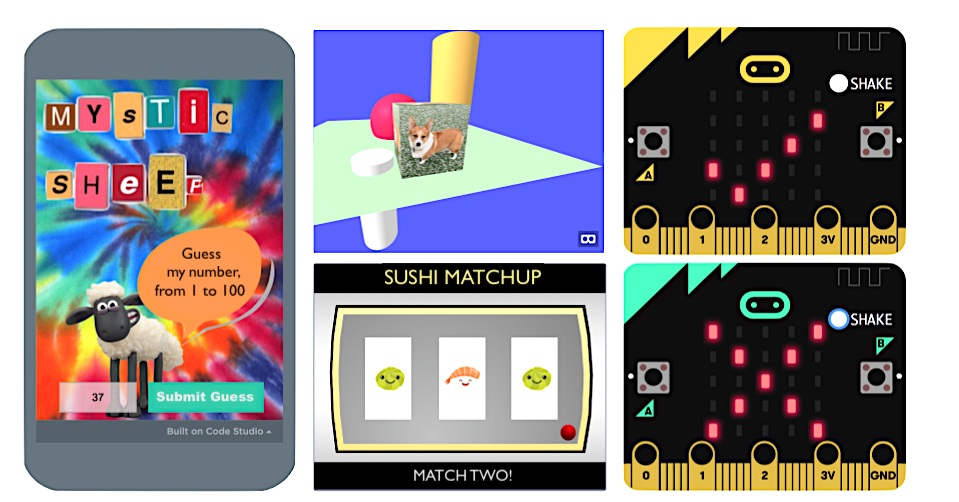
The fab four (clockwise from left): App Lab (Code.org), A-Frame (CodeHS), MakeCode for micro:bit, and Scratch (MIT) provide fun, free platforms to get kids coding!

Demand for K12 coding courses outpaces availability.
Most parents want their child to take a computer science course, but few schools in the United States offer one. How can families expose kids to coding without breaking the bank? Try these four, free, fabulous, fun ways to get your kid, tween, or teen coding:
1. Scratch
Scratch is a kids’ coding language in which learners will snap together command blocks to build programs. Coders program in Scratch using a website dashboard to build and run code. The dashboard contains all the command blocks and assets -- images and sounds -- that kids will need to create something exciting in a matter of minutes.
Programs made in Scratch, such as arcade games (Pac-Man), digital toys (such as Sushi Matchup), models (coin flipping), and animated scenes (including those that speak in world languages!), run on computers and tablets and can be shared with friends. While Scratch code is not used for professional purposes, the programming skills learned by working in Scratch are authentic and transferable to most any other language.
Kids will need to create a free account to use Scratch, and parents will need to approve project sharing.
2. App Lab
App Lab is a teaching platform from Code.org where coders use a block-based version of JavaScript to create smartphone apps that can use the touch sensor. App Lab offers users a website dashboard to snap together command blocks and execute program code. The dashboard features command blocks and a few sound assets, but coders will need to upload their own image files (from a Google search) into App Lab.
What’s cool about App Lab, is that programs can be tested in an onscreen simulator and then shared via a link sent by text message to anyone. During one of my summer sessions, campers had a blast sending their coding creations to their parents, apps including a Snack Vote Machine, a Weird Text Message generator and a Mystic Sheep number guessing game (really a binary search algorithm in disguise!) As learner proficiency grows, App Lab lets coders level up to text-based coding, setting the stage for professional JavaScript programming.
Users will need to create a free account (targeting those 13+) to use App Lab.
3. MakeCode
MakeCode is another great, web-based introductory coding platform where kids write control programs for an electronics board called a micro:bit. Using block or text-based JavaScript kids work in a dashboard featuring programming commands and a simulator where they can test out the micro:bit gadgets they build. Commands for reading sensors, like an accelerometer and thermometer, are included as well as commands for sending and reading electrical signals and lighting up LEDs!
For kids who really groove on coding in MakeCode, parents can purchase a real micro:bit (with battery pack and USB cable) for under $20. With the physical micro:bit board, your kid can make and code a backpack alarm, a fortune-telling device, a temperature gauge to alert you when popsicles are frozen, and -- with two micro:bits communicating via radio -- a classic card game of War!
No account is needed to work in MakeCode.
4. A-Frame
A-Frame lets your kid capitalize on the VR craze! CodeHS makes it a snap to get started with a free, online Intro to Virtual Reality course featuring editable examples, short videos, and a code runner to write and test code. Kids will build their first virtual worlds in minutes using HTML and the A-Frame JavaScript Library. Creations can then be explored in VR using a computer, a smartphone, or an Oculus Rift.
My students loved the simplicity of the code (warning -- it is text-based) and how easy it is to populate the 3D space with objects which they can color, position, size, and texture with their own uploaded photos (because hey, who doesn’t want see a Corgi on a cube?) The course builds up to lessons on animating, coding gaze-based interactions, and working with 360 degree images and videos.
An adult will need to sign up for CodeHS -- use the Create Teacher Account path -- and then register kids via the join code. The free teacher account gives you access to everything except grading.
The bottom line: Your local school may not get coding into the curriculum fast enough to help your kid. But plenty of free, online resources are available for kids to begin learning how to code at home. Scratch, App Lab, MakeCode, and A-Frame (through the Intro to VR course by CodeHS) provide great starting points with a high degree of fun and do-ability. Each learning platform also provides tons of tutorials and examples to help kids gain experience and confidence as coders!

Dummies books support learning to code at home.
For additional help and step-by-step programming projects check out my book, Coding for Kids for Dummies (2nd edition). And for parents seeking tips for helping their kids learn to code -- including unplugged activities -- check out my Helping Kids with Coding for Dummies, co-written with Sarah Guthals.
Statistics graphic courtesy of CS Education Week, 2019
Seven Personalities of Young Coders - And How to Teach Them
Knowing the personalities of your young coders — from the chuteless skydiver to the angst-ridden artist — is the first step toward creating positive instructional experiences in computer science.

Chuteless Skydiver? Artist? Tech Guru? Kid personalities inform how to best teach them coding.
There is a wide range of dispositions when it comes to getting kids of all ages started in coding. Whether you’re a parent or a teacher, knowing your audience is the first step towards creating positive computer science experiences. Here are a few of the (many!) personality types you may encounter -- and how to best help them learn to code:
1. The chuteless skydiver
This kid dives right in, trying every command, without any specific plan of action. Celebrate his confidence at the keyboard while simultaneously steering this kid towards advance thinking and planning. A few years ago, a new child at our school was very proud of his Scratch expertise – which turned out to be dragging out hundreds of Scratch tiles and assembling them in nonsensical ways in the program workspace. Over time, we helped him evolve skills in conceptualizing an idea and then translating it into functional code. Helping the skydiving coder to work procedurally and incrementally, deriving satisfaction from planning a project and bringing it to fruition (not just free falling!), are behaviors you want to foster.
2. The my-parents-made-me-sign-up-for-coding kid
This kiddo’s parents are the drivers of her foray into coding. She might not have an opinion just yet about coding, but she also may not have much say in the matter, either. Empower this young coder by providing ample opportunities to make choices for herself by designing open-ended projects through which she can personalize and steer her work. Remember, most simple game code is representative of just a handful of genres (collection, avoidance, shooting, platform, etc.) and a roomful of coders can invent endless, unique cover stories for the same underlying program.
3. The rational actor
This kiddo wants to learn a new concept and then try out the associated code at the computer, one step at a time. This type of learner usually experiences success but may struggle when confronted with an information gap in which he needs a command he has not learned. Coach this child to branch out and research on his own, employing a bit of grit in finding a solution -- while tolerating a temporary state of coding limbo.
4. The angst-ridden artist
Artists can view coding as the cold antithesis of the creative, unbounded expression they live for. This is your golden opportunity to show them that -- like the paintbrush or the potter’s wheel -- coding is a tool for transforming an idea-in-the-head into something into the real world. While there are rules for using the tool, the possibilities of what you can create with that tool are nearly limitless. And with something like coding for virtual reality, even newbie programmers can produce eye-popping, immersive worlds, providing aesthetic and emotional experiences beyond the stuff of tangible matter. (Check out this free Intro to VR course from CodeHS!)
5. The happy passenger
Surprisingly, even the most easygoing of kids may be a bit tentative about coding – even if he is a die-hard game-player or social media guru! He may seem in command of tech until he has to pop the hood and get into the mechanics of writing actual code. He has some tech-savvy, but until this point, he was just happy to be along for the ride. You’ll need to help him understand that you’re going to support his efforts in transitioning from a tech user to a tech maker – through learning to code. One of my best high schoolers fell into this category and had his wake-up moment at a recent internship interview (when he realized that a real company needed real skills -- and would pay for them!)
6. The deer-in-the-headlights
These kids are completely new to coding and are a little shell-shocked at the perception that everyone else in the room seems to be “in-the-know” and they’re not. Remind yourself that they are not dumb, they are not behind, they are not lazy -- their experiences and expertise may emphasize other disciplines not immediately obvious to you. Find ways to connect with what they know: the trajectory towards mastery of any complex task, whether it’s playing piano, skateboarding, or coding requires very similar behaviors. It’s your job to exhibit patience and optimism while teaching foundational concepts and cultivating persistence through a growth mindset -- and that goes for all the learners in your care.
7. The next tech guru
This kid loves coding, knows everything about coding, wants to do more coding, watches Silicon Valley, has built a computer, and has already applied to the Stanford Computer Science undergrad program with plans of eventually working in cybersecurity for the NSA. Continue to cheer for this kid, help clear the runway for her by removing trivial obstacles -- which often exist in school settings -- and actively seek projects, competitions, and peer programmers (who may be older) as partners for her. You can invite her to help mentor others, but don’t over-occupy her time with this -- she needs (and wants!) to use her valuable time to grow her skills as a coder. Who knows, she may be the next Bill Gates, or Katherine Johnson!
The bottom lIne: Regardless of which kids – and which coder personalities you encounter (likely all of them and more!) – meet them where they are, and help lift them to the next level. You have an important role in fostering their coding foundations and building both the hard and soft skills of a coder. Onwards!
Expanded from “Personalities of Young Coders” in Helping Kids with Coding for Dummies (McCue and Guthals, 2018)
Photo composition includes image purchased from iStock photo
Egg-Citing Crash Helmet Design
Conducting their problem-solving in an applied context showed students that computing a final velocity or a “delta t” is not the end of a problem, but the beginning of a solution – the solution to protecting heads from crash injuries.

Seniors giving their culminating Egg Crash Helmet presentation.
As part of a schoolwide evolution towards authentic, project based learning, teaching teams at our school — the Adelson Educational Campus — are reimagining traditionally-taught content in the context of engaging and rigorous projects to be executed over several weeks. The Crash Helmet Design project, in which students create a device for protecting an “egg head” from a fall or crash injury, represents one such project. Here’s our step-by-step guide to transforming the timeless egg drop challenge to a STEM PBL engaging both the scientific method and the design thinking process, delivered via mixed (face-to-face and asynchronous) instruction:
Reimagine the Traditional Egg-Drop Challenge
Using an interdisciplinary approach, the project was conducted jointly by the science department and our Startup Incubator faculty. Content which had previously been delivered face-to-face via lectures, problem sets, and labs during the Mechanics phase of introductory, high school physics was reworked in a thematic, applied unit of study and formatted as a ten-day sequence of investigative and experimental activities. Throughout the redesign and implementation, the teaching team sought a retreat from the classic, teacher-centric instructional model and a migration towards “a collaborative culture for teachers and students,” a key, fundamental best practice of successful project-based learning (PBL) [David, 2008].
Focus on STEM Content
The evolved Crash Helmet Design project applied physics concepts consisting of linear kinematics, Newton’s Laws, impulse, and elastic/inelastic collisions, teaching the basics of each concept “just in time” as applicable to the project. Simultaneously, students employed the Stanford d.school design thinking process – empathizing, defining, ideating, prototyping, and testing – to produce crash helmets for the purpose of protecting users from traumatic brain injury, using an egg to simulate a human head.
Get Student Buy-In
Motivation for selecting the real-world problem of the crash helmet was derived, in part, from the age group of the target student audience: high school juniors and seniors who have recently received their driver’s licenses. Students’ new personal connections to a potential source of injury – car accidents which may result in traumatic brain injury (TBI) – fostered interest and stimulated investment in the first phase of the design thinking process, empathizing with the individuals affected by a specific problem. Each subsequent phase of the design thinking process hinged on the success of students’ initial buy-in, and each posed its own implementation challenges with regard to instruction and evaluation.
“Learning to apply theoretical principles is much better done when given real problems and hands-on activities in projects” [Shekar, 2014].
Employ Relevant Technologies
Throughout the PBL (project based learning) unit, the physics teacher and I coached students in using a variety of technologies at various stages to construct and convey their learning. These included online research and graphical layout tools to create a TBI infographic; Google Sheets to record, analyze, and graph collected data; Quicktime to record a vlog; Coggle to create an ideation document; Tinkercad and Fusion 360 to design crash helmets for 3D printing; and Google Slides to construct final presentations following helmet drop testing.
Apply Best Practices
Best practices for successful project implementation were sought from literature, applied throughout the project, and enhanced by our own local experiences. Specific practices which proved critical to the success of the project included workspace planning, emphasizing reconfigurability of the work areas depending on the current design thinking phase; one-to-world technology access, including uninterrupted use of laptops and 3D printers; sufficient, at-school time-on-task, via block scheduling; formative evaluations, which required (for most tasks) transitioning to rubric-based authentic assessments in lieu of “right-or-wrong” problem sets; and instructional delivery methods, which ultimately took the form of flipped lessons, collaborative work sessions, and checkpoint meetings with instructors.
Add Flexibility via Face-to-Face and Asynchronous Delivery
Flipped lessons consisted of both original videos recorded by our instructional team and existing YouTube content, presented to students via our website. The flexibility afforded by flipped lessons and an effective online learning management system (Edsby) proved uniquely necessary due to a variety of daily schedule inconsistencies including sports event absences and multiple Jewish holidays. Working both synchronously and asynchronously, students successfully executed the Crash Helmet Design project, exhibiting mastery in physics content, the engineering design process, and soft skills including research, collaboration, pivoting, and presentation.
Culminate in a Big Finish

Testing a prototype prior to the big “drop day.”
Like any egg crash project, the culminating “drop day” featured students strapping eggs into their 3D-printed helmets, then dropping them from successively higher altitudes until either the eggs cracked or the helmets failed. Teams measured the success of their designs against the problem statements they had previously written during the design phase, determining whether their helmets met, beat, or did not meet specifications. After cleaning some gooey splats, teams presented their design thinking process and discussed the iterative steps to improving and refining designs, considering what it would take to finalize an egg crash helmet for production and distribution.
The bottom line: The Crash Helmet Design project brought to life for our students something which typically lives only on paper for high school physics students: equations of motion and the impulse formula. Conducting their problem-solving in an applied context showed students that computing a final velocity or a “delta t” is not the end of a problem, but the beginning of a solution – the solution to protecting heads from crash injuries. And that’s a real-world problem worth solving.
References
Shekar, A. (2014). Project-based learning in engineering design education: Sharing best practices. Retrieved from https://www.asee.org/public/conferences/32/papers/10806/download.
David, J. (2008). What Research Says About Project-Based Learning. Retrieved from http://www.ascd.org/publications/educational_leadership/feb08/vol65/num05/Project-Based_Learning.aspx
Photo Credit: Camille McCue
Most Likely to Succeed
Education. We all got one. What does it mean now to be educated, how do we structure school, and what makes the next generation, Most Likely to Succeed?
Posts
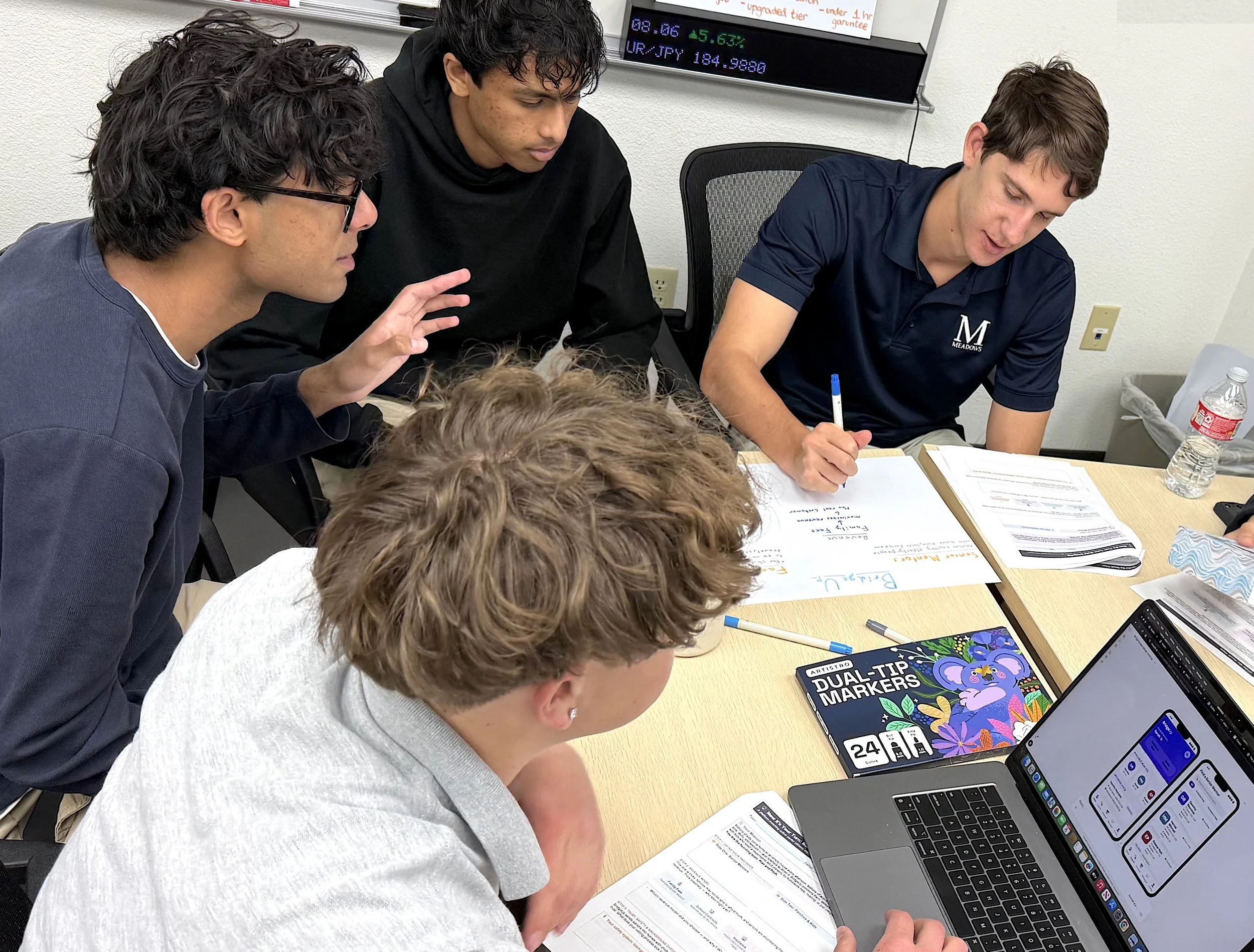
School’s out, but DECA advisors are already planning for next season. Prepare now for the challenge regarding ICDC absences. To colleagues, these feel egregious, as competitors spend only 15 minutes before judges while the rest is seen as “fun.” The frustration is real, but DECA conference engagement is about so much more than just competition. Here are the evergreen skills students are actually building.