Four, Free, Fabulous, Fun Ways to Get Kids Coding
Parents want schools to offer computer science, but most don’t. Here are four, fabulous, free, fun ways to get your kid, tween, or teen coding!
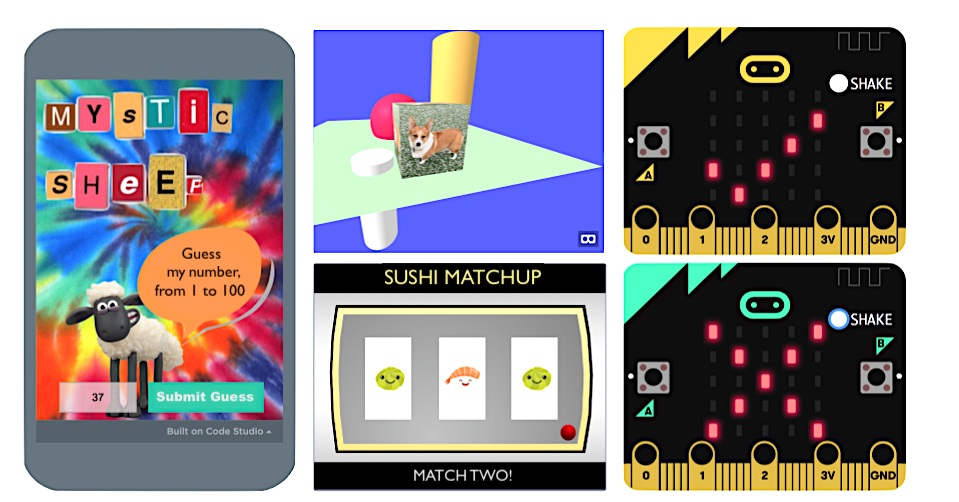
The fab four (clockwise from left): App Lab (Code.org), A-Frame (CodeHS), MakeCode for micro:bit, and Scratch (MIT) provide fun, free platforms to get kids coding!

Demand for K12 coding courses outpaces availability.
Most parents want their child to take a computer science course, but few schools in the United States offer one. How can families expose kids to coding without breaking the bank? Try these four, free, fabulous, fun ways to get your kid, tween, or teen coding:
1. Scratch
Scratch is a kids’ coding language in which learners will snap together command blocks to build programs. Coders program in Scratch using a website dashboard to build and run code. The dashboard contains all the command blocks and assets -- images and sounds -- that kids will need to create something exciting in a matter of minutes.
Programs made in Scratch, such as arcade games (Pac-Man), digital toys (such as Sushi Matchup), models (coin flipping), and animated scenes (including those that speak in world languages!), run on computers and tablets and can be shared with friends. While Scratch code is not used for professional purposes, the programming skills learned by working in Scratch are authentic and transferable to most any other language.
Kids will need to create a free account to use Scratch, and parents will need to approve project sharing.
2. App Lab
App Lab is a teaching platform from Code.org where coders use a block-based version of JavaScript to create smartphone apps that can use the touch sensor. App Lab offers users a website dashboard to snap together command blocks and execute program code. The dashboard features command blocks and a few sound assets, but coders will need to upload their own image files (from a Google search) into App Lab.
What’s cool about App Lab, is that programs can be tested in an onscreen simulator and then shared via a link sent by text message to anyone. During one of my summer sessions, campers had a blast sending their coding creations to their parents, apps including a Snack Vote Machine, a Weird Text Message generator and a Mystic Sheep number guessing game (really a binary search algorithm in disguise!) As learner proficiency grows, App Lab lets coders level up to text-based coding, setting the stage for professional JavaScript programming.
Users will need to create a free account (targeting those 13+) to use App Lab.
3. MakeCode
MakeCode is another great, web-based introductory coding platform where kids write control programs for an electronics board called a micro:bit. Using block or text-based JavaScript kids work in a dashboard featuring programming commands and a simulator where they can test out the micro:bit gadgets they build. Commands for reading sensors, like an accelerometer and thermometer, are included as well as commands for sending and reading electrical signals and lighting up LEDs!
For kids who really groove on coding in MakeCode, parents can purchase a real micro:bit (with battery pack and USB cable) for under $20. With the physical micro:bit board, your kid can make and code a backpack alarm, a fortune-telling device, a temperature gauge to alert you when popsicles are frozen, and -- with two micro:bits communicating via radio -- a classic card game of War!
No account is needed to work in MakeCode.
4. A-Frame
A-Frame lets your kid capitalize on the VR craze! CodeHS makes it a snap to get started with a free, online Intro to Virtual Reality course featuring editable examples, short videos, and a code runner to write and test code. Kids will build their first virtual worlds in minutes using HTML and the A-Frame JavaScript Library. Creations can then be explored in VR using a computer, a smartphone, or an Oculus Rift.
My students loved the simplicity of the code (warning -- it is text-based) and how easy it is to populate the 3D space with objects which they can color, position, size, and texture with their own uploaded photos (because hey, who doesn’t want see a Corgi on a cube?) The course builds up to lessons on animating, coding gaze-based interactions, and working with 360 degree images and videos.
An adult will need to sign up for CodeHS -- use the Create Teacher Account path -- and then register kids via the join code. The free teacher account gives you access to everything except grading.
The bottom line: Your local school may not get coding into the curriculum fast enough to help your kid. But plenty of free, online resources are available for kids to begin learning how to code at home. Scratch, App Lab, MakeCode, and A-Frame (through the Intro to VR course by CodeHS) provide great starting points with a high degree of fun and do-ability. Each learning platform also provides tons of tutorials and examples to help kids gain experience and confidence as coders!

Dummies books support learning to code at home.
For additional help and step-by-step programming projects check out my book, Coding for Kids for Dummies (2nd edition). And for parents seeking tips for helping their kids learn to code -- including unplugged activities -- check out my Helping Kids with Coding for Dummies, co-written with Sarah Guthals.
Statistics graphic courtesy of CS Education Week, 2019
Seven Personalities of Young Coders - And How to Teach Them
Knowing the personalities of your young coders — from the chuteless skydiver to the angst-ridden artist — is the first step toward creating positive instructional experiences in computer science.

Chuteless Skydiver? Artist? Tech Guru? Kid personalities inform how to best teach them coding.
There is a wide range of dispositions when it comes to getting kids of all ages started in coding. Whether you’re a parent or a teacher, knowing your audience is the first step towards creating positive computer science experiences. Here are a few of the (many!) personality types you may encounter -- and how to best help them learn to code:
1. The chuteless skydiver
This kid dives right in, trying every command, without any specific plan of action. Celebrate his confidence at the keyboard while simultaneously steering this kid towards advance thinking and planning. A few years ago, a new child at our school was very proud of his Scratch expertise – which turned out to be dragging out hundreds of Scratch tiles and assembling them in nonsensical ways in the program workspace. Over time, we helped him evolve skills in conceptualizing an idea and then translating it into functional code. Helping the skydiving coder to work procedurally and incrementally, deriving satisfaction from planning a project and bringing it to fruition (not just free falling!), are behaviors you want to foster.
2. The my-parents-made-me-sign-up-for-coding kid
This kiddo’s parents are the drivers of her foray into coding. She might not have an opinion just yet about coding, but she also may not have much say in the matter, either. Empower this young coder by providing ample opportunities to make choices for herself by designing open-ended projects through which she can personalize and steer her work. Remember, most simple game code is representative of just a handful of genres (collection, avoidance, shooting, platform, etc.) and a roomful of coders can invent endless, unique cover stories for the same underlying program.
3. The rational actor
This kiddo wants to learn a new concept and then try out the associated code at the computer, one step at a time. This type of learner usually experiences success but may struggle when confronted with an information gap in which he needs a command he has not learned. Coach this child to branch out and research on his own, employing a bit of grit in finding a solution -- while tolerating a temporary state of coding limbo.
4. The angst-ridden artist
Artists can view coding as the cold antithesis of the creative, unbounded expression they live for. This is your golden opportunity to show them that -- like the paintbrush or the potter’s wheel -- coding is a tool for transforming an idea-in-the-head into something into the real world. While there are rules for using the tool, the possibilities of what you can create with that tool are nearly limitless. And with something like coding for virtual reality, even newbie programmers can produce eye-popping, immersive worlds, providing aesthetic and emotional experiences beyond the stuff of tangible matter. (Check out this free Intro to VR course from CodeHS!)
5. The happy passenger
Surprisingly, even the most easygoing of kids may be a bit tentative about coding – even if he is a die-hard game-player or social media guru! He may seem in command of tech until he has to pop the hood and get into the mechanics of writing actual code. He has some tech-savvy, but until this point, he was just happy to be along for the ride. You’ll need to help him understand that you’re going to support his efforts in transitioning from a tech user to a tech maker – through learning to code. One of my best high schoolers fell into this category and had his wake-up moment at a recent internship interview (when he realized that a real company needed real skills -- and would pay for them!)
6. The deer-in-the-headlights
These kids are completely new to coding and are a little shell-shocked at the perception that everyone else in the room seems to be “in-the-know” and they’re not. Remind yourself that they are not dumb, they are not behind, they are not lazy -- their experiences and expertise may emphasize other disciplines not immediately obvious to you. Find ways to connect with what they know: the trajectory towards mastery of any complex task, whether it’s playing piano, skateboarding, or coding requires very similar behaviors. It’s your job to exhibit patience and optimism while teaching foundational concepts and cultivating persistence through a growth mindset -- and that goes for all the learners in your care.
7. The next tech guru
This kid loves coding, knows everything about coding, wants to do more coding, watches Silicon Valley, has built a computer, and has already applied to the Stanford Computer Science undergrad program with plans of eventually working in cybersecurity for the NSA. Continue to cheer for this kid, help clear the runway for her by removing trivial obstacles -- which often exist in school settings -- and actively seek projects, competitions, and peer programmers (who may be older) as partners for her. You can invite her to help mentor others, but don’t over-occupy her time with this -- she needs (and wants!) to use her valuable time to grow her skills as a coder. Who knows, she may be the next Bill Gates, or Katherine Johnson!
The bottom lIne: Regardless of which kids – and which coder personalities you encounter (likely all of them and more!) – meet them where they are, and help lift them to the next level. You have an important role in fostering their coding foundations and building both the hard and soft skills of a coder. Onwards!
Expanded from “Personalities of Young Coders” in Helping Kids with Coding for Dummies (McCue and Guthals, 2018)
Photo composition includes image purchased from iStock photo
Most Likely to Succeed
Education. We all got one. What does it mean now to be educated, how do we structure school, and what makes the next generation, Most Likely to Succeed?
Posts
School’s out, but DECA advisors are already planning for next season. Prepare now for the challenge regarding ICDC absences. To colleagues, these feel egregious, as competitors spend only 15 minutes before judges while the rest is seen as “fun.” The frustration is real, but DECA conference engagement is about so much more than just competition. Here are the evergreen skills students are actually building.